
Short answer
Start with videos: a few minutes of 4K video can take more space than hundreds of photos. Then clear old screenshots, bursts and near-identical shots, and finally go through your oldest months. Empty Recently Deleted or the trash afterwards, or the space won’t come back.
Where to look first on iPhone and Android
| Where to look first | iPhone | Android |
|---|---|---|
| What uses space | Settings → General → iPhone Storage | Settings → Storage (Samsung: Battery and device care → Storage) |
| Long videos | Photos → Collections → Media Types → Videos | The Camera folder in Google Photos or Gallery |
| Screenshots | Media Types → Screenshots | The Screenshots folder |
| Repeats and copies | Media Types → Bursts; Utilities → Duplicates | Files by Google → Clean |
| Trash to empty | Recently Deleted (kept 30 days) | Trash in Google Photos and Gallery (30 days) |
Start with the longest videos
Video is where the gigabytes are. Apple notes that faster frame rates and higher resolutions make larger video files, so a minute of 4K at 60 fps takes far more space than the same minute in 1080p. You can see which format your iPhone records in under Settings → Camera → Record Video.
- iPhone: in Photos, tap Collections → Media Types → Videos. Each thumbnail shows the video’s length.
- Android: open the Camera folder in Google Photos or your Gallery app, or check Settings → Storage → Videos.
Good candidates: videos you’ve already shared or saved elsewhere, failed takes, and accidental pocket recordings.
Old screenshots and saved images
Screenshots are small one by one, but they pile up by the thousand, along with memes and images saved from chats. Most are useless a week later. See how to delete screenshots on iPhone and Android for the fastest way to clear them all, or only the old ones.
Bursts, repeats and accidental shots
Burst shots, ten takes of the same pose, blurry photos and pictures of the floor add up fast.
- iPhone: Media Types → Bursts collects burst sequences so you can keep just the best frame. Utilities → Duplicates finds exact copies and lets you merge them.
- Android: the Clean screen in Files by Google can suggest duplicate files.
For near-identical shots that aren’t exact copies, you have to look and choose. Shoo doesn’t detect duplicates or blurry photos either: you decide card by card, which takes longer than an automatic tool but means nothing is deleted without your say-so.
Work through your oldest months, one at a time
The oldest part of a library is usually the least looked at, and the easiest to cut. Both Photos on iPhone and Google Photos show your library as a timeline grouped by date, so pick one month, clear it and move on. A month is small enough to finish in one go. For a routine that keeps the gallery tidy afterwards, see how to clean up your camera roll.
Deleted but still full? Empty the trash
Deleted photos and videos usually wait in a trash first, and keep using space there:
- iPhone: Recently Deleted keeps items for 30 days. Collections → Recently Deleted → View Album → Select → More → Delete All. Step by step: empty Recently Deleted.
- Google Photos: Collections → Trash → More → Empty trash. Items stay there 30 days.
- Samsung Gallery: menu → Trash. Items stay there 30 days.
- Shoo on Android: there’s no trash. Deletion is permanent, so the space frees up at once. See how to free up space on Android.
How Shoo helps
Shoo shows one photo or video at a time: swipe to keep it or queue it for deletion, then review the queue before anything is deleted. These settings point it at the biggest wins:
- Longest videos first: shows only videos, the longest at the top.
- Older than 30 days or Start from a month: work through the old part of the library.
- Source: the Screenshots album on iPhone (needs full photo access) or the Screenshots folder on Android.
- Stats: Shoo shows how much space you’ve freed (“at least” when it couldn’t read the size of some items, such as iCloud-only originals). On iPhone it also reminds you that the space fully frees up once Recently Deleted is emptied.
On Android, the date filters go by the capture date, so photos and videos without one (often screenshots and saved files) don’t show up with them.
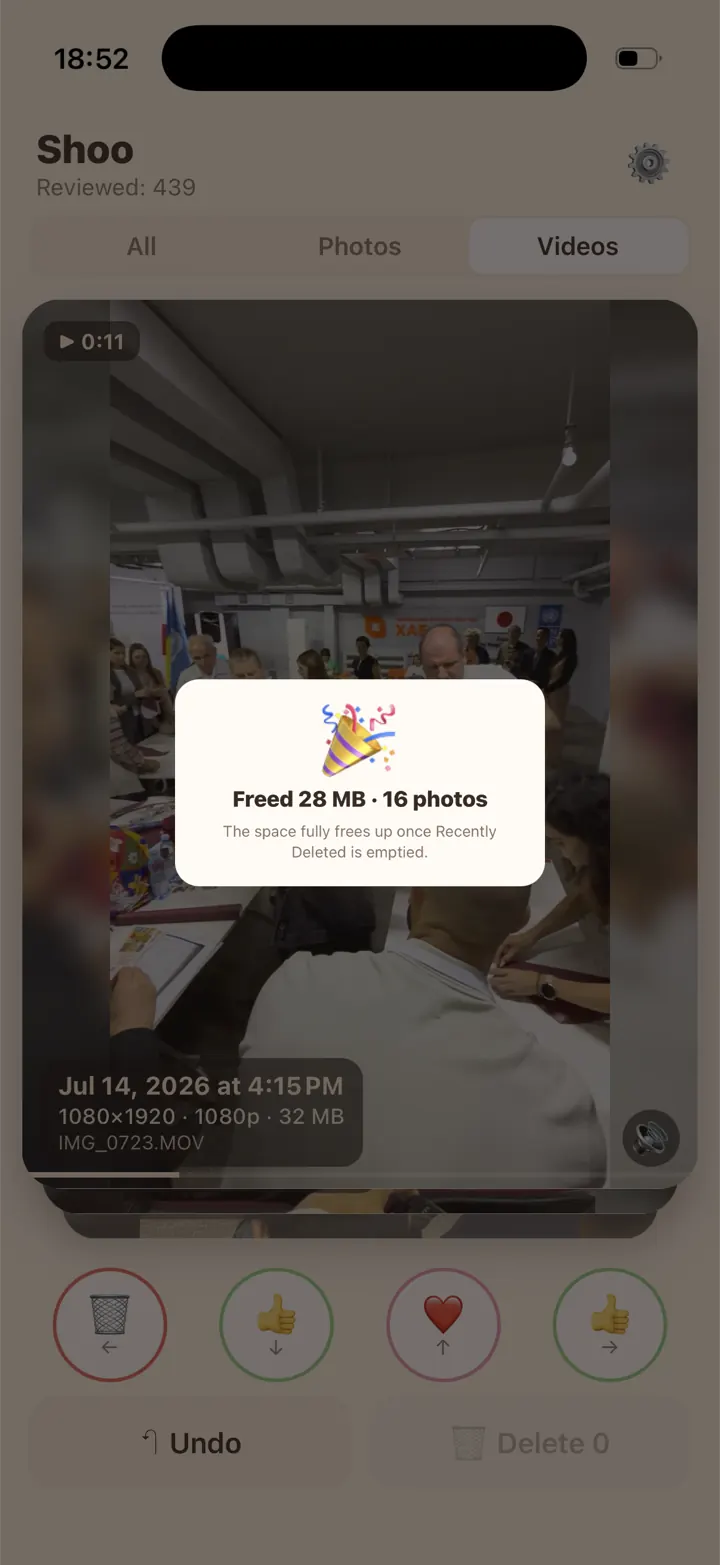
What Shoo doesn’t do: it doesn’t find duplicates or blurry photos and doesn’t compress anything.



iPhone version coming soon.
Questions
Do photos or videos take more space?
Videos, by far. A single minute of video can take as much space as dozens of photos, and 4K or 60 fps makes the files bigger still. That’s why the longest videos are the best place to start.
Does Optimize iPhone Storage delete photos?
No. With iCloud Photos on, it keeps the full-resolution originals in iCloud and smaller, space-saving versions on your iPhone when space runs low. Nothing is removed from your library.
I deleted lots of photos. Why didn’t my storage change?
They’re still in the trash: Recently Deleted on iPhone, or the trash in Google Photos or your Gallery app on Android. Empty it and the space comes back.
Sources
- Apple Support: Manage your photo and video storage
- Apple Support: Delete photos on your iPhone or iPad
- iPhone User Guide: Record a video (video formats and file size)
- iPhone User Guide: Locate photos and videos by media type
- Android Help: Free up storage on your Android device
- Google Photos Help: Delete photos and videos
- Files by Google Help: Clear your junk files